pyfreya.revenue package
Submodules
pyfreya.revenue.revenue module
Short Tutorial in the Revenue Classes.
Let’s import the class and insert a some retention numbers along with the amount of new users in a cohort. Additional information about Retention and Cohort classes can be found at retention tutorial and cohort tutorial. Let’s also import a predefined revenue spending class (profile) ARPDAU.
                        1
DaysSinceInstall
0                     100
1                 50.0629
2                 32.1914
3                 24.8632
4                 20.6996
5                 17.9566
6                 15.9875
7                 14.4921
8                 13.3102
9                  12.348
10                11.5464
11                10.8662
12                10.2802
13                9.76917
14                9.31867
15                8.91795
16                8.55872
17                8.23447
18                7.94001
19                7.67118
20                7.42456
21                7.19733
22                6.98716
23                6.79206
24                6.61038
25                6.44069
26                6.28175
27                6.13252
28                5.99207
29                 5.8596
30                 5.7344
31                5.61586
| dau | revenue | |
|---|---|---|
| Date | ||
| 1 | 100 | 210 |
| 2 | 50.0629 | 105.132 |
| 3 | 32.1914 | 67.6019 |
| 4 | 24.8632 | 52.2127 |
| 5 | 20.6996 | 43.4692 |
| 6 | 17.9566 | 37.7089 |
| 7 | 15.9875 | 33.5737 |
| 8 | 14.4921 | 30.4334 |
| 9 | 13.3102 | 27.9515 |
| 10 | 12.348 | 25.9309 |
| 11 | 11.5464 | 24.2475 |
| 12 | 10.8662 | 22.819 |
| 13 | 10.2802 | 21.5885 |
| 14 | 9.76917 | 20.5153 |
| 15 | 9.31867 | 19.5692 |
| 16 | 8.91795 | 18.7277 |
| 17 | 8.55872 | 17.9733 |
| 18 | 8.23447 | 17.2924 |
| 19 | 7.94001 | 16.674 |
| 20 | 7.67118 | 16.1095 |
| 21 | 7.42456 | 15.5916 |
| 22 | 7.19733 | 15.1144 |
| 23 | 6.98716 | 14.673 |
| 24 | 6.79206 | 14.2633 |
| 25 | 6.61038 | 13.8818 |
| 26 | 6.44069 | 13.5254 |
| 27 | 6.28175 | 13.1917 |
| 28 | 6.13252 | 12.8783 |
| 29 | 5.99207 | 12.5833 |
| 30 | 5.8596 | 12.3052 |
| 31 | 5.7344 | 12.0422 |
As can be seen, there is also room for adding uncertainty. Let’s import
the base revenue class and define ARPDAU but with uncertainty. It does
make use of some properties of the Cohort class, it is recommended
to be a bit familiar with that.
| dau | revenue | |
|---|---|---|
| Date | ||
| 1 | 100 | 210 |
| 2 | 50.0629 | 105.132 |
| 3 | 32.1914 | 67.6019 |
| 4 | 24.8632 | 52.2127 |
| 5 | 20.6996 | 43.4692 |
| 6 | 17.9566 | 37.7089 |
| 7 | 15.9875 | 33.5737 |
| 8 | 14.4921 | 30.4334 |
| 9 | 13.3102 | 27.9515 |
| 10 | 12.348 | 25.9309 |
| 11 | 11.5464 | 24.2475 |
| 12 | 10.8662 | 22.819 |
| 13 | 10.2802 | 21.5885 |
| 14 | 9.76917 | 20.5153 |
| 15 | 9.31867 | 19.5692 |
| 16 | 8.91795 | 18.7277 |
| 17 | 8.55872 | 17.9733 |
| 18 | 8.23447 | 17.2924 |
| 19 | 7.94001 | 16.674 |
| 20 | 7.67118 | 16.1095 |
| 21 | 7.42456 | 15.5916 |
| 22 | 7.19733 | 15.1144 |
| 23 | 6.98716 | 14.673 |
| 24 | 6.79206 | 14.2633 |
| 25 | 6.61038 | 13.8818 |
| 26 | 6.44069 | 13.5254 |
| 27 | 6.28175 | 13.1917 |
| 28 | 6.13252 | 12.8783 |
| 29 | 5.99207 | 12.5833 |
| 30 | 5.8596 | 12.3052 |
| 31 | 5.7344 | 12.0422 |
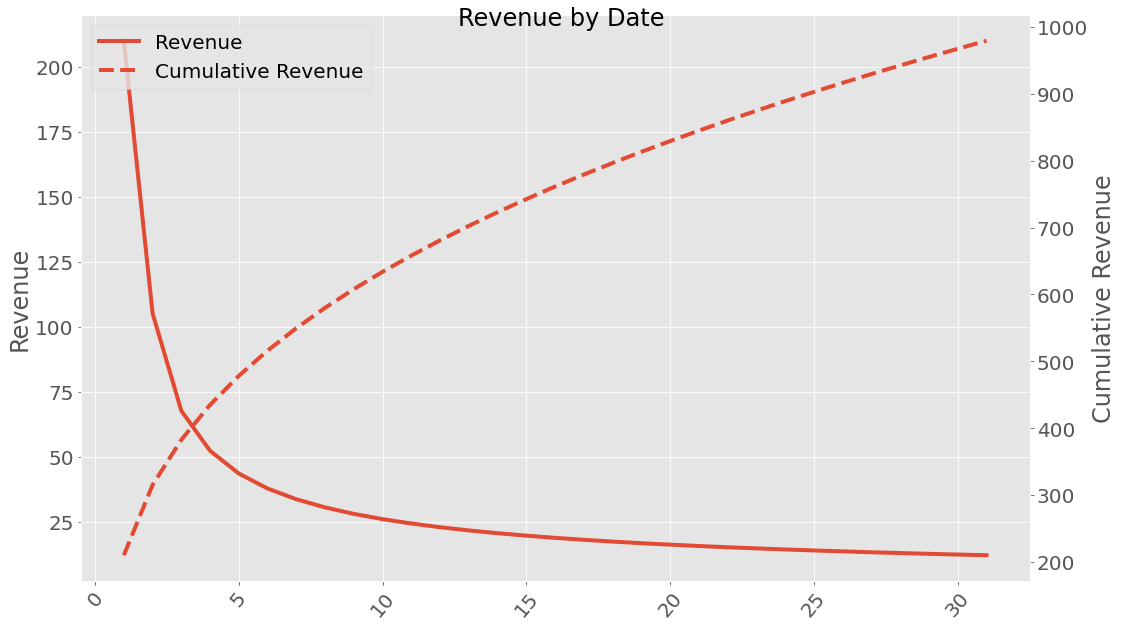
If we are interested in uncertainties the Uncertainties package have been implemented. This can be used the following way:
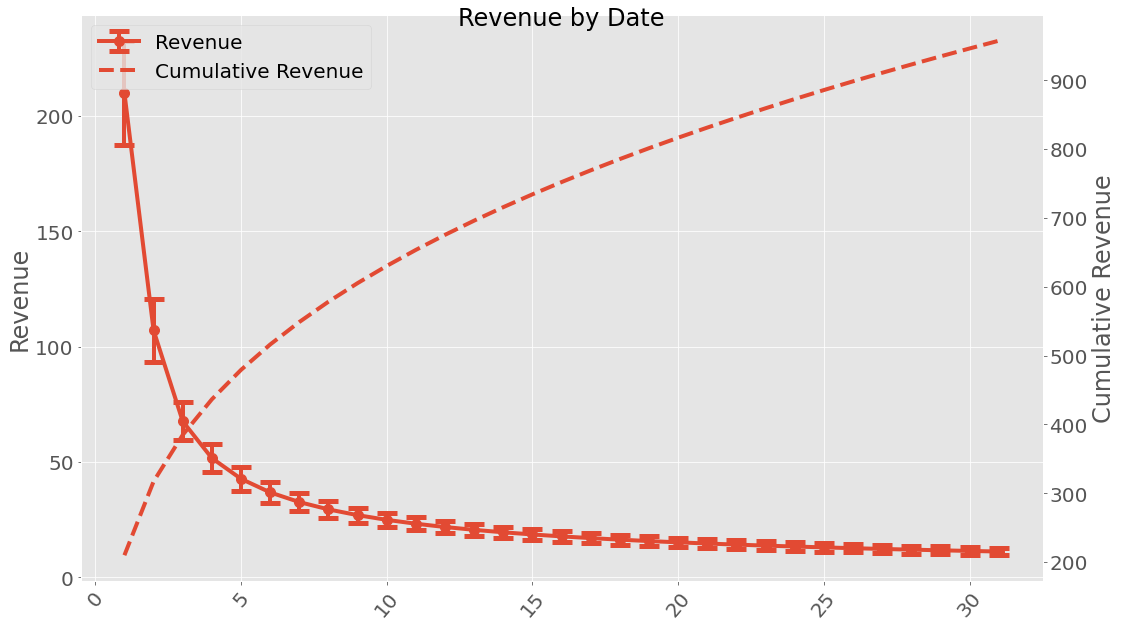
When working with uncertainties, the nominal values and the uncertainty
values can be obtained with functions nominal_values and
std_devs, respectively:
Date
1       210+/-23
2       107+/-14
3         68+/-8
4         52+/-6
5         43+/-5
6         37+/-4
7         33+/-4
8         30+/-4
9     27.0+/-3.3
10    25.0+/-3.1
11    23.3+/-2.9
12    21.9+/-2.8
13    20.6+/-2.6
14    19.6+/-2.5
15    18.6+/-2.4
16    17.8+/-2.3
17    17.1+/-2.2
18    16.4+/-2.2
19    15.8+/-2.1
20    15.2+/-2.0
21    14.7+/-2.0
22    14.2+/-1.9
23    13.8+/-1.9
24    13.4+/-1.8
25    13.0+/-1.8
26    12.7+/-1.8
27    12.4+/-1.7
28    12.1+/-1.7
29    11.8+/-1.7
30    11.5+/-1.6
31    11.2+/-1.6
Name: revenue, dtype: object
array([210.        , 107.11673044,  67.66930193,  51.72634515,
        42.74901227,  36.8733419 ,  32.67730124,  29.50438329,
        27.00601304,  24.97849563,  23.29415112,  21.86853369,
        20.64336873,  19.57703135,  18.63892795,  17.80602528,
        17.06062202,  16.38887082,  15.77976993,  15.22445827,
        14.71571191,  14.24757745,  13.81510062,  13.41412211,
        13.04112202,  12.69309974,  12.36748022,  12.06203999,
        11.77484823,  11.50421944,  11.24867512])
array([22.588714  , 13.73966474,  8.17827559,  6.15442801,  5.07962406,
        4.40195366,  3.9300445 ,  3.57937697,  3.3066122 ,  3.08712987,
        2.90585349,  2.75300466,  2.62194609,  2.5080031 ,  2.40778109,
        2.31875073,  2.23898552,  2.16699004,  2.1015841 ,  2.04182268,
        1.9869392 ,  1.93630468,  1.88939763,  1.84578168,  1.80508855,
        1.76700502,  1.73126286,  1.69763082,  1.66590837,  1.63592067,
        1.60751445])
It is possible to save a revenue class instance (using pickle) and loading it.
facebook.save('facebook_revenue.pkl')
facebook_loaded = pyfreya.load('facebook_revenue.pkl')
Revenue Classes
-
class
pyfreya.revenue.revenue.ARPDAU(arpdau=0.0)[source]¶ Bases:
pyfreya.revenue.revenue.BaseRevenueA basic revenue spending class. It applies an average revenue to each active users on a given date. There is no uncertainty applied to this class.
Module contents
Inits revenue