pyfreya.cohort package
Submodules
pyfreya.cohort.cohort module
Short Tutorial in the Cohort Class.
Retention
Let’s import the class and see insert a some retention numbers along with the amount of new users in the cohort.
To get more info on retenion see retention tutorial.
                        1
DaysSinceInstall
0                     100
1                 50.0629
2                 32.1914
3                 24.8632
4                 20.6996
5                 17.9566
6                 15.9875
7                 14.4921
8                 13.3102
9                  12.348
10                11.5464
11                10.8662
12                10.2802
13                9.76917
14                9.31867
15                8.91795
16                8.55872
17                8.23447
18                7.94001
19                7.67118
20                7.42456
21                7.19733
22                6.98716
23                6.79206
24                6.61038
25                6.44069
26                6.28175
27                6.13252
28                5.99207
29                 5.8596
30                 5.7344
31                5.61586
Note: That the cohort class can also take a retention profile instead of actual retention data points. The name given is not of any particular importance now, but when plotting various aggregates from multiple cohorts easily identifiable names are nice to have - is no name given a random one will be applied.
Daily Active Users
Maybe similar cohorts comes in multiple days in a row. It is moddeled like this:
                       1        2        3        4        5        6        7        8        9        10
DaysSinceInstall
0                     100      100      100      100      100      100      100      100      100      100
1                 50.0629  50.0629  50.0629  50.0629  50.0629  50.0629  50.0629  50.0629  50.0629  50.0629
2                     NaN  32.1914  32.1914  32.1914  32.1914  32.1914  32.1914  32.1914  32.1914  32.1914
3                     NaN      NaN  24.8632  24.8632  24.8632  24.8632  24.8632  24.8632  24.8632  24.8632
4                     NaN      NaN      NaN  20.6996  20.6996  20.6996  20.6996  20.6996  20.6996  20.6996
5                     NaN      NaN      NaN      NaN  17.9566  17.9566  17.9566  17.9566  17.9566  17.9566
6                     NaN      NaN      NaN      NaN      NaN  15.9875  15.9875  15.9875  15.9875  15.9875
7                     NaN      NaN      NaN      NaN      NaN      NaN  14.4921  14.4921  14.4921  14.4921
8                     NaN      NaN      NaN      NaN      NaN      NaN      NaN  13.3102  13.3102  13.3102
9                     NaN      NaN      NaN      NaN      NaN      NaN      NaN      NaN   12.348   12.348
10                    NaN      NaN      NaN      NaN      NaN      NaN      NaN      NaN      NaN  11.5464
Well - its nice to see this user distribution, but how many daily active users do we have ? (also note the type is a pandas DataFrame)
<class 'pandas.core.frame.DataFrame'>
| dau | |
|---|---|
| Date | |
| 1 | 100 |
| 2 | 150.063 |
| 3 | 182.254 |
| 4 | 207.117 |
| 5 | 227.817 |
| 6 | 245.774 |
| 7 | 261.761 |
| 8 | 276.253 |
| 9 | 289.563 |
| 10 | 301.912 |
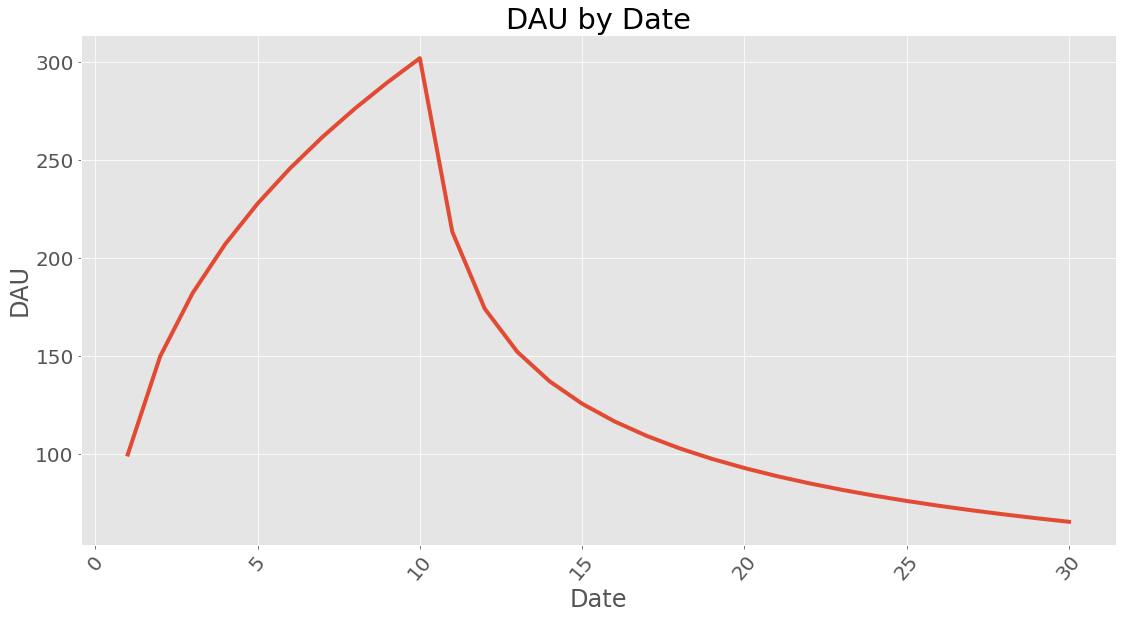
Since users are still active after the influx of 10 days lets see what it looks like after 30 days (10 days of user influx and 20 days of waiting):
| dau | |
|---|---|
| Date | |
| 1 | 100 |
| 2 | 150.063 |
| 3 | 182.254 |
| 4 | 207.117 |
| 5 | 227.817 |
| 6 | 245.774 |
| 7 | 261.761 |
| 8 | 276.253 |
| 9 | 289.563 |
| 10 | 301.912 |
| 11 | 213.458 |
| 12 | 174.261 |
| 13 | 152.35 |
| 14 | 137.256 |
| 15 | 125.875 |
| 16 | 116.836 |
| 17 | 109.408 |
| 18 | 103.15 |
| 19 | 97.7799 |
| 20 | 93.103 |
| 21 | 88.9812 |
| 22 | 85.3123 |
| 23 | 82.0192 |
| 24 | 79.0421 |
| 25 | 76.3338 |
| 26 | 73.8566 |
| 27 | 71.5796 |
| 28 | 69.4776 |
| 29 | 67.5297 |
| 30 | 65.7181 |
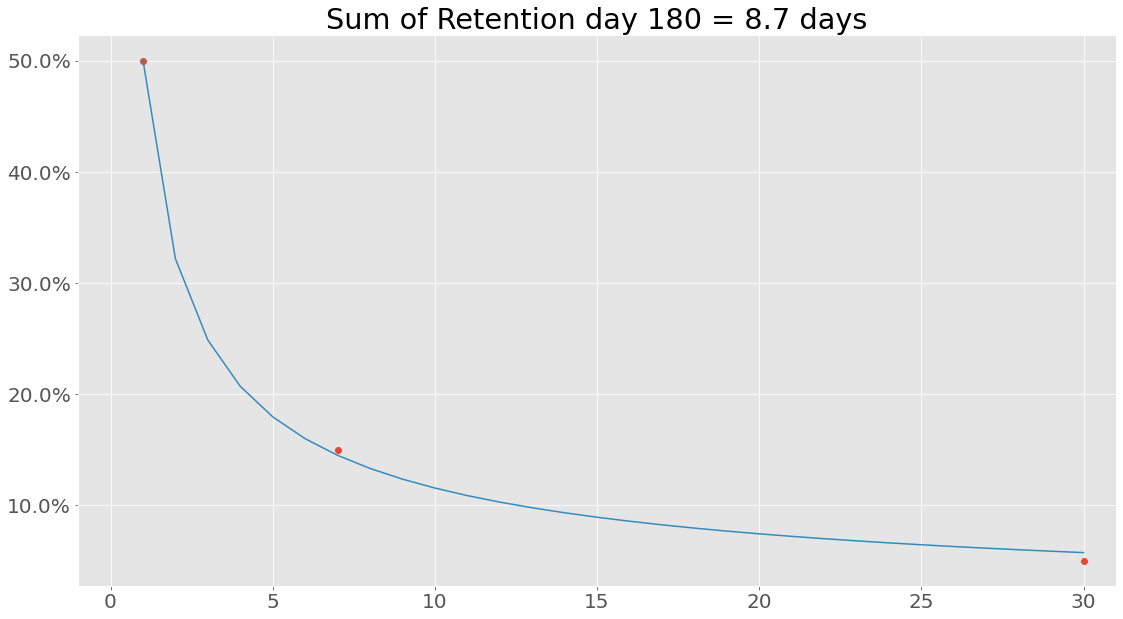
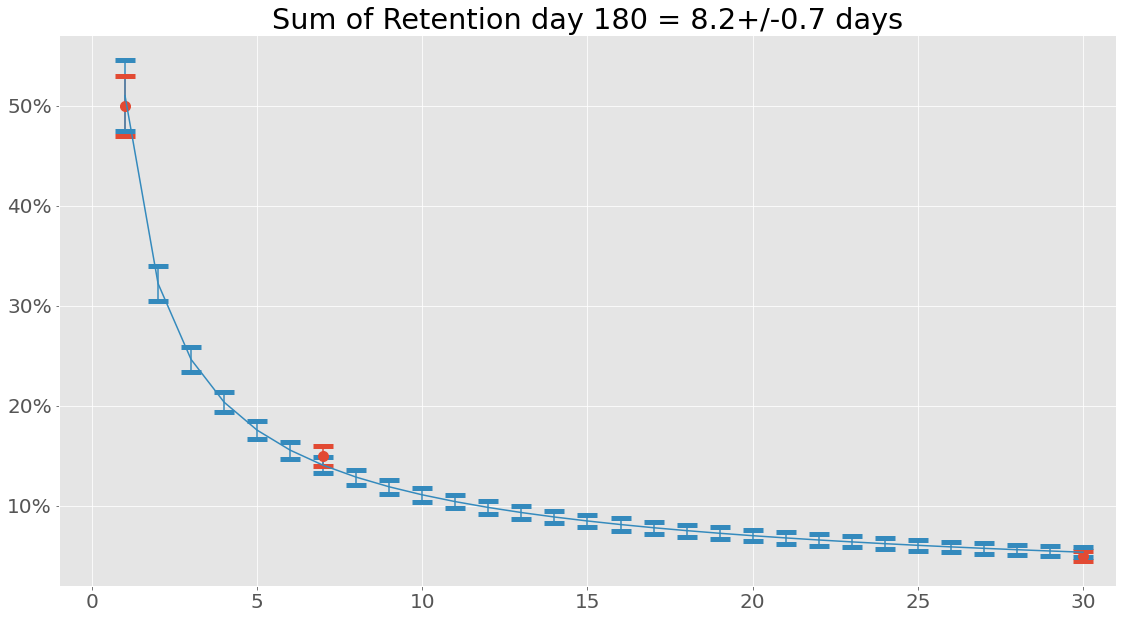
Enough numbers, lets plot some of this. First, lets plot the retention - maybe it fitted the data incorrectly:
How about dau?
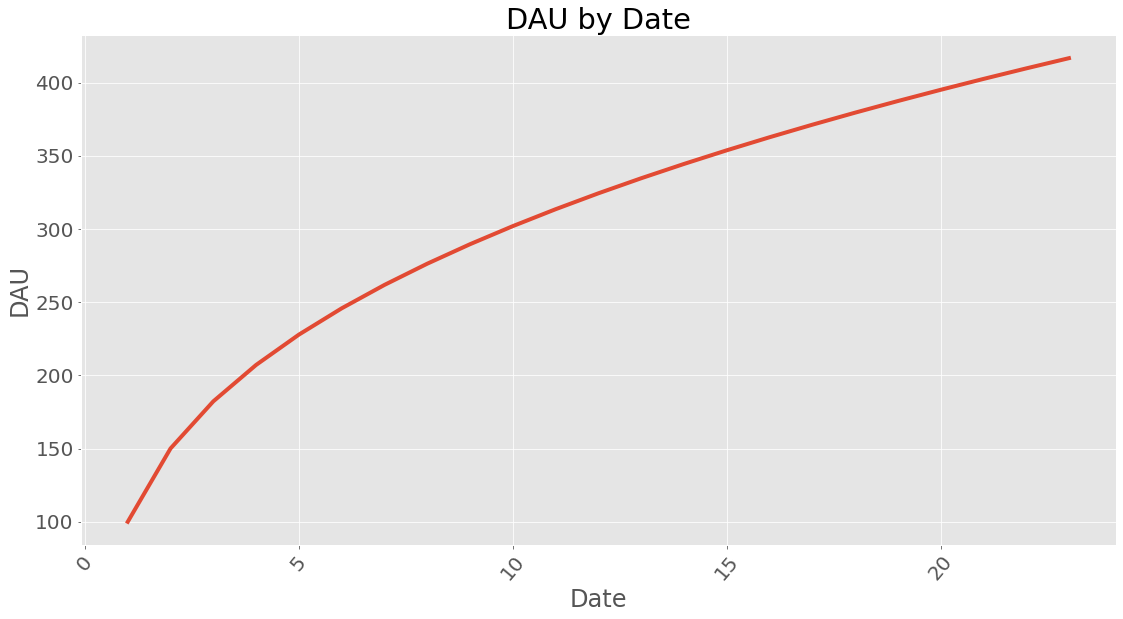
If you wonder how long time it takes to reach a certain amount of dau it can be calculated. This does assume a steady influx of users given in new_users and with the retention profile calculated earlier.
21
Datetime
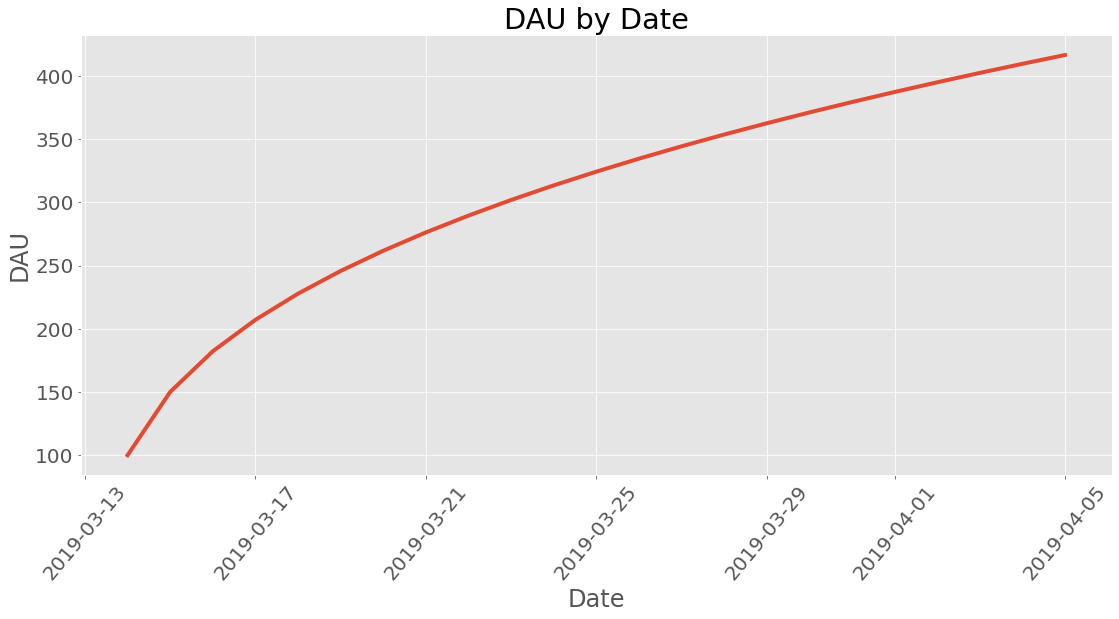
What kind of date is this anyway? Lets use proper human dates from the Gregorian calendar:
Revenue
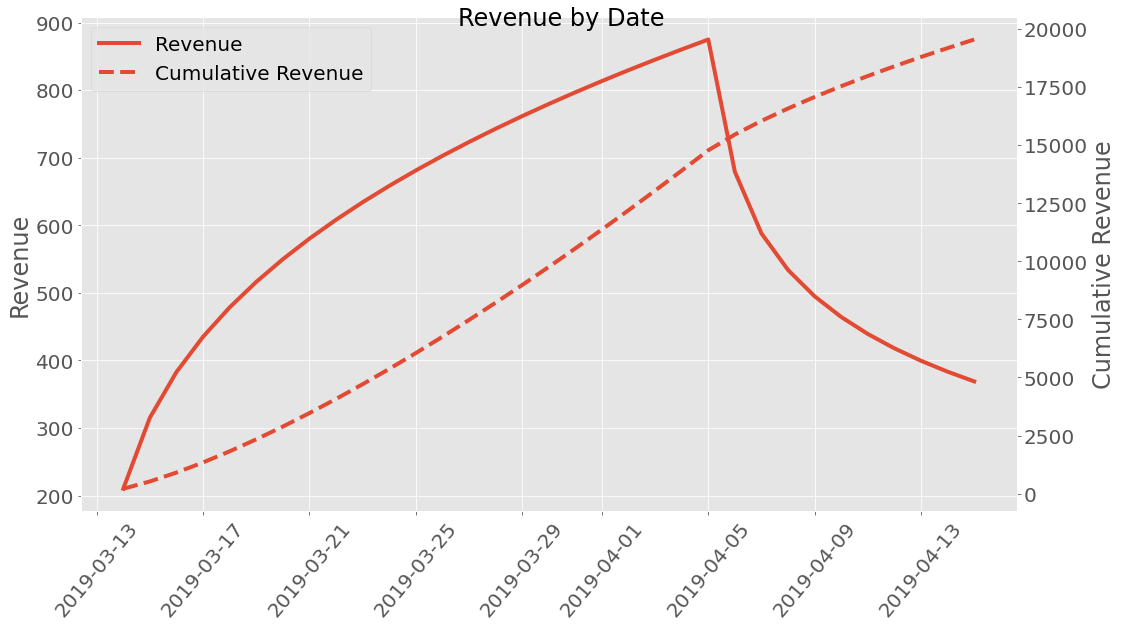
Well how much money did we earn? A premade revenue profile class called
ARPDAU is imported and is initialized by setting the ARPDAU to a
value.
| dau | revenue | |
|---|---|---|
| Date | ||
| 2019-03-14 | 100 | 210 |
| 2019-03-15 | 150.063 | 315.132 |
| 2019-03-16 | 182.254 | 382.734 |
| 2019-03-17 | 207.117 | 434.947 |
| 2019-03-18 | 227.817 | 478.416 |
| 2019-03-19 | 245.774 | 516.125 |
| 2019-03-20 | 261.761 | 549.698 |
| 2019-03-21 | 276.253 | 580.132 |
| 2019-03-22 | 289.563 | 608.083 |
| 2019-03-23 | 301.912 | 634.014 |
| 2019-03-24 | 313.458 | 658.262 |
| 2019-03-25 | 324.324 | 681.081 |
| 2019-03-26 | 334.604 | 702.669 |
| 2019-03-27 | 344.374 | 723.184 |
| 2019-03-28 | 353.692 | 742.754 |
| 2019-03-29 | 362.61 | 761.481 |
| 2019-03-30 | 371.169 | 779.455 |
| 2019-03-31 | 379.403 | 796.747 |
| 2019-04-01 | 387.343 | 813.421 |
| 2019-04-02 | 395.015 | 829.531 |
| 2019-04-03 | 402.439 | 845.122 |
| 2019-04-04 | 409.636 | 860.237 |
| 2019-04-05 | 416.624 | 874.91 |
| 2019-04-06 | 323.416 | 679.173 |
| 2019-04-07 | 279.963 | 587.923 |
| 2019-04-08 | 254.212 | 533.846 |
| 2019-04-09 | 235.631 | 494.825 |
| 2019-04-10 | 221.064 | 464.234 |
| 2019-04-11 | 209.099 | 439.109 |
| 2019-04-12 | 198.971 | 417.84 |
| 2019-04-13 | 190.214 | 399.449 |
| 2019-04-14 | 182.519 | 383.291 |
| 2019-04-15 | 175.675 | 368.917 |
This can be plotted too!
If we are interested in uncertainties the Uncertainties package have been implemented. This can be used the following way:
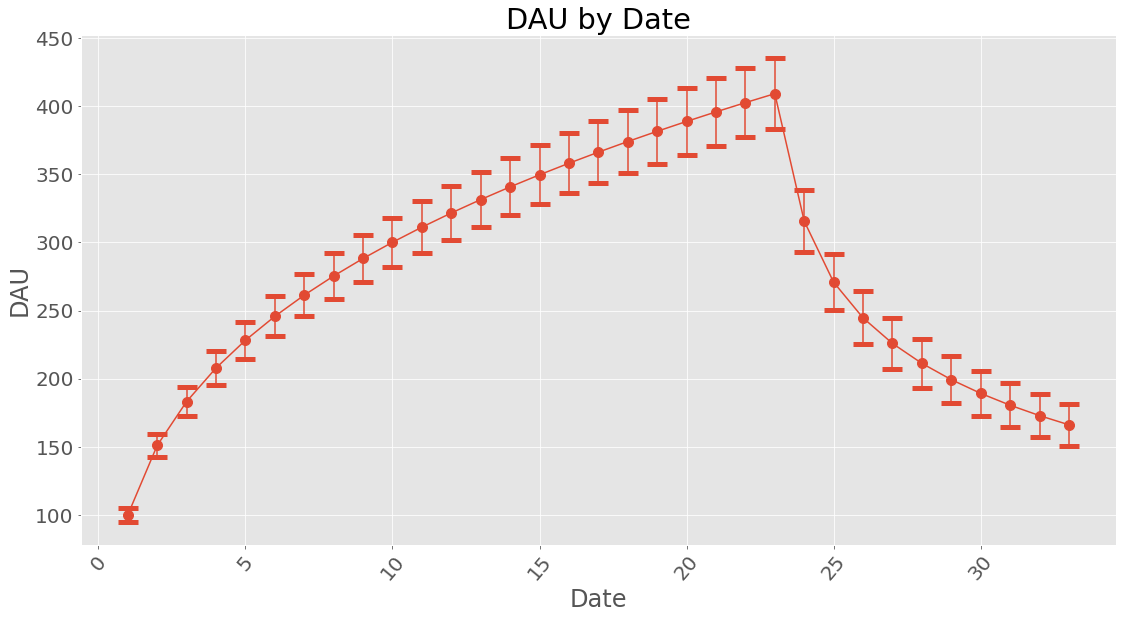
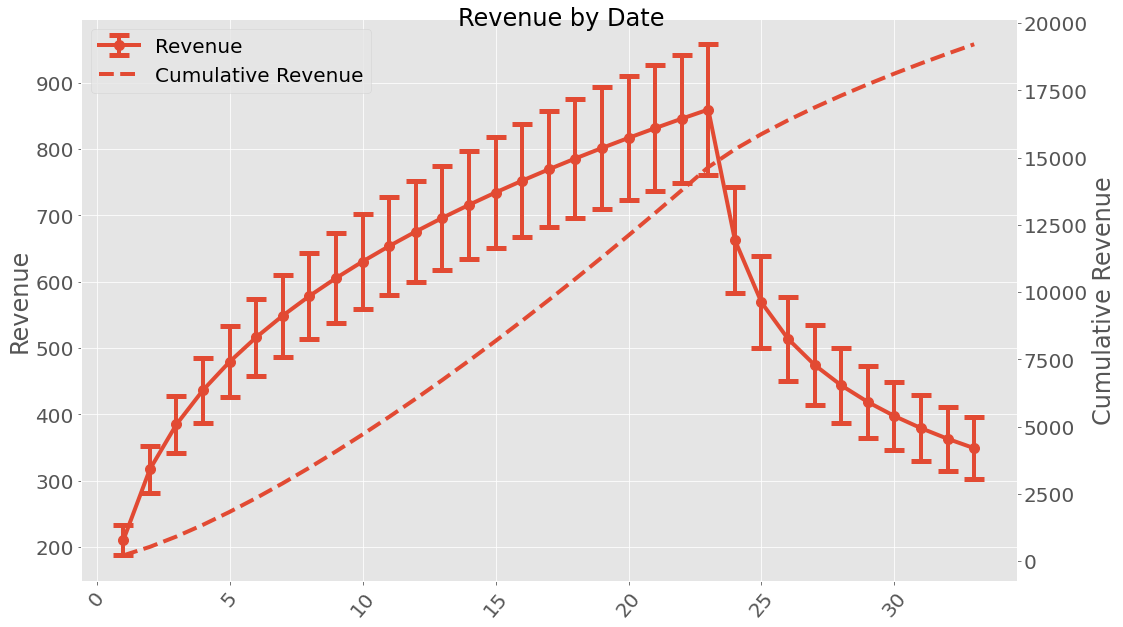
When working with uncertainties, the nominal values and the uncertainty
values can be obtained with functions nominal_values and
std_devs, respectively:
Date
1      100+/-5
2      151+/-8
3     183+/-11
4     208+/-12
5     228+/-14
6     246+/-15
7     261+/-16
8     275+/-17
9     288+/-17
10    300+/-18
11    311+/-19
12    322+/-20
13    331+/-20
14    341+/-21
15    350+/-22
16    358+/-22
17    366+/-23
18    374+/-23
19    382+/-24
20    389+/-24
21    396+/-25
22    403+/-26
23    409+/-26
24    316+/-23
25    271+/-21
26    245+/-19
27    226+/-19
28    211+/-18
29    199+/-17
30    189+/-17
31    181+/-16
32    173+/-16
33    166+/-16
Name: dau, dtype: object
array([100.        , 151.00796688, 183.23144399, 207.86303692,
       228.21970943, 245.77844367, 261.3390633 , 275.38876963,
       288.24877584, 300.14329757, 311.23575048, 321.64933796,
       331.47951354, 340.80190942, 349.6775894 , 358.15664906,
       366.28075478, 374.08497899, 381.59915514, 388.84889718,
       395.85637904, 402.64093973, 409.21955908, 315.60723627,
       270.8093275 , 244.6301836 , 225.88786696, 211.27502302,
       199.32335936, 189.24093946, 180.54774509, 172.92912575,
       166.16687945])
array([ 5.        ,  8.34935123, 10.56825389, 12.20066331, 13.51786087,
       14.6418741 , 15.63646161, 16.53872917, 17.37200759, 18.15183883,
       18.88905055, 19.59146105, 20.26488384, 20.91374916, 21.54150443,
       22.1508812 , 22.74407817, 23.32289008, 23.88880016, 24.44304807,
       24.98668034, 25.52058868, 26.04553928, 22.86365271, 20.63415691,
       19.40634919, 18.5255104 , 17.82742722, 17.24464372, 16.74232945,
       16.29990806, 15.90409195, 15.54574024])
It is possible to save a cohort class instance (using pickle) and loading it.
facebook.save('facebook_revenue.pkl')
import pyfreya
facebook_loaded = pyfreya.load('facebook_revenue.pkl')
Cohort Class
-
class
pyfreya.cohort.cohort.Cohort(new_users, days_since_install=None, retention_values=None, retention_function='power', retention_profile=None, start_date=1, revenue_profile=None, name='')[source]¶ Bases:
objectCohort class new_users parameter must be provided. To add retention, either add retention and days since install values or supply a pre-made retention profile - see
Retention.-
apply_revenue(revenue_profile=None)[source]¶ Given a revenue profile and a cohort apply the revenue profile to get revenue and revenue uncertainty.
Parameters: revenue_profile ( Optional[BaseRevenue]) – The revenue profile to use, if none is provided it will assume thatone was provided earlier. :return:
-
days_to_dau(goal, max_days=360)[source]¶ Calculates the number of days until a given dau count have been reached. To not continue into infinity (and beyond) it is ensured that the maximum amount of days is max_days.
Parameters: - goal (
int) – The amount of DAU that is the goal. - max_days – The maximum number of days to look through.
Returns: - goal (
-
days_to_rev(goal, max_days=360)[source]¶ Calculates the number of days until revenue of a single day hav reached goal or above. To not continue into infinity (and beyond) it is ensured that the maximum amount of days is max_days.
Parameters: - goal (
float) – Daily revenue goal. - max_days – The maximum number of days to look trough.
Returns: - goal (
-
days_to_total_rev(goal, max_days=360)[source]¶ Calculates the number of days until the cumulative revenue have reached goal To not continue into infinity (and beyond) it is ensured that the maximum amount of days is max_days.
Parameters: - goal (
float) – Cumulative revenue goal. - max_days – The maximum number of days to look through.
Returns: - goal (
-
plot_revenue()[source]¶ Plot the revenue with uncertainty (left y-axis) and cumulative revenue (right y-axis). The cumulative revenue could also have uncertainty, though it is not obvious how to calculate this. The best bet is probably `error propagation
Returns:
-
replicate_cohort(n_days_since_install, post_influx_duration=0)[source]¶ Replicate the cohort over multiple days. The number of dates are concurrent and given in the first parameter. If it is of any interest to see the cohorts after the influx of them have stopped post_influx_duration can be set to some amount of days.
Parameters: - n_days_since_install (
int) – Number of days a new (equivalent) cohort starts. - post_influx_duration – The number of days to wait after the last cohort have been
added. :return:
- n_days_since_install (
-
Module contents
inits cohort